Architecture
How a spoken sentence becomes an action.

Diagram source
flowchart LR
    MIC[Microphone<br/>sounddevice] --> WAKE[Wake word<br/>Vosk grammar]
    WAKE -->|heard 'black'| STT[Hybrid STT<br/>whisper.cpp, then Vosk]
    STT --> ROUTER[Router<br/>42 regex rules]
    ROUTER --> SKILL[Skill]
    SKILL --> TTS[Speaker<br/>piper / espeak-ng]

    STT -.-> BUS((Event bus))
    ROUTER -.-> BUS
    SKILL -.-> BUS
    BUS -.-> UI[Tray icon<br/>+ overlay]
    BUS -.-> CTRL[Control socket<br/>for other frontends]
Solid arrows are the data path. Dotted arrows are events — the UI never touches the audio layer directly, it only subscribes, and neither does anything outside the process: that is what the control socket is for.
The layers
| Module | Responsibility |
|---|---|
blackvoice/audio/ |
Microphone capture, speech recognition, speech output, wake word |
blackvoice/nlu/ |
Turning a transcript into an Intent |
blackvoice/skills/ |
Doing the thing |
blackvoice/core/ |
Event bus, logging, the shell safety guard |
blackvoice/ui/ |
Tray icon, popup overlay, the painted logo |
blackvoice/app.py |
The engine — audio loop, state machine, confirmations |
The audio loop
Engine._loop() runs on its own thread:
- Read a block from the microphone (16 kHz, 16-bit mono, 8000 samples)
- Feed it to the wake-word detector
- On a hit — or when the tray icon is clicked — enter a conversation
A conversation is one activation: listen, understand, act, answer.
Wake word
Vosk accepts a restricted grammar, which turns the general recogniser into a
cheap keyword spotter: it only has to decide between the wake phrases and
[unk]. That keeps idle CPU low, which matters for something that sits in the
tray all day.
If grammar mode is unavailable, it degrades to fuzzy matching over normal partial results, at a similarity ratio of 0.78.
Endpointing
Recording stops on silence, not on Vosk's own utterance boundaries:
level >= silence_threshold  ->  speech, reset the silence counter
level <  silence_threshold  ->  silence, accumulate
silence >= silence_timeout  ->  stop recording
Doing it on the audio level rather than the recogniser means it behaves identically when only the cloud path exists.
Hybrid recognition
Three tiers, tried in order, each one only reached when the one before it did not answer:
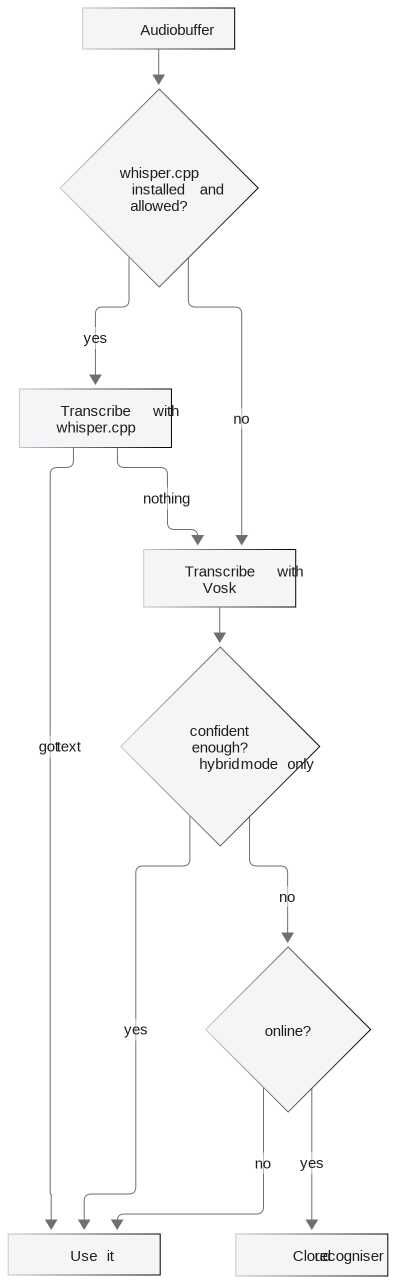
Diagram source
flowchart TD
    A[Audio buffer] --> W{whisper.cpp<br/>installed and allowed?}
    W -->|yes| WR[Transcribe with whisper.cpp]
    WR -->|got text| DONE[Use it]
    WR -->|nothing| V
    W -->|no| V[Transcribe with Vosk]
    V --> C{confident enough?<br/>hybrid mode only}
    C -->|yes| DONE
    C -->|no| O{online?}
    O -->|yes| CLOUD[Cloud recogniser]
    O -->|no| DONE
Why use whisper.cpp over Vosk at all? It is simply a more accurate model. Vosk is small and fast enough to keep loaded all the time, but whisper.cpp gets more commands right, at the cost of a subprocess call per utterance instead of a streaming pass.
Why is Vosk still here, then? Two reasons: it is the fallback for a
machine that has not installed whisper.cpp (speech.engine: "auto", the
default, degrades to it silently — see Configuration → speech),
and it is what streams, which is why it alone does wake-word detection.
Connectivity, for the cloud tier, is probed with a 1-second TCP connect to
8.8.8.8:53, cached for 20 seconds so it is not repeated per utterance.
How well any of this actually works on your voice is not something to
guess at: blackvoice eval record / blackvoice eval run measure it — see
Configuration → speech.
Intent routing
A rule is a regex with optional named groups; a named group becomes a slot.
Rule("volume_set", "system", "volume_set", [
    r"\b(?:set\s+)?volume\s*(?:to|at|=)?\s*(?P<value>\d{1,3})\b",
])
Rules are tried in order, first match wins, so ordering is part of the design:
- Specific rules come before general ones
- The generic
open X/close Xrules are tried last, otherwiseopen downloadswould never reach the folder rule andrun command df -hwould be read as an application named “command df -h” - Two rules get a second look in
Router._is_bad_match—calculateneeds a real operator, andopen/closereject question-shaped phrases
Anything matching nothing becomes ai.ask, so an unrecognised sentence is
answered rather than rejected.
Skills
Every skill implements one method:
class Skill(ABC):
    name: str

    @abstractmethod
    def handle(self, intent: Intent) -> Reply: ...
Reply carries what to say, what to display, whether it succeeded, and
optionally a confirmation prompt with a callback:
Reply(
    speech="Should I really shut down? Say yes to confirm.",
    confirm="Shut down the computer?",
    on_confirm=lambda: self._really_shut_down(),
)
The engine holds that callback as a PendingConfirmation for 30 seconds. A
“yes” runs it; a “no”, a “stop”, a different command, or the timeout all drop it.
SkillRegistry.dispatch wraps every call in a try/except — a skill that raises
returns an error reply instead of taking down the audio loop.
Portability
Linux desktops disagree about which tools are installed, so nothing is assumed. Every action probes a list of candidates and uses the first one present:
| Action | Tried in order |
|---|---|
| Volume | wpctl (PipeWire) → pactl (PulseAudio) → amixer (ALSA) |
| Brightness | brightnessctl → light → /sys/class/backlight |
| Screenshot | gnome-screenshot → spectacle → grim → scrot → import → maim |
| Lock | loginctl → xdg-screensaver → gnome-screensaver → swaylock → i3lock → dm-tool |
| Speech | piper → espeak-ng → spd-say → pyttsx3 |
| Browser | firefox → chromium → google-chrome → brave-browser → vivaldi → epiphany |
A launched app runs through its own transient systemd-run --user unit,
not as a direct child of the service (Skill.spawn, blackvoice/skills/base.py).
The install this project ships runs as a systemd user service
(packaging/blackvoice.service, NoNewPrivileges=true among its hardening),
and a snap-packaged app - Firefox on Ubuntu, by default - refuses to start
as a direct descendant of one: snapd's own confinement needs a cgroup shaped
like a session or scope, and NoNewPrivileges blocks the privilege
snap-confine needs even inside one. Routing the fork through the systemd
user manager instead, and forwarding DISPLAY/WAYLAND_DISPLAY/XAUTHORITY/
DBUS_SESSION_BUS_ADDRESS explicitly (systemd-run does not inherit either
by default), is what actually gets it on screen.
This is why it works on GNOME, KDE, Xfce and tiling window managers without configuration.
Threads
| Thread | Runs |
|---|---|
| main | Qt event loop, tray icon, overlay |
engine |
Audio loop, recognition, skill dispatch |
tts |
Speech output queue |
control |
The control socket's own asyncio event loop |
| timers | One short-lived thread per timer or reminder |
The UI must only be touched from the Qt thread, so the engine publishes to the
event bus and BusBridge re-emits each event as a Qt signal with
QueuedConnection. That hop is what makes it safe. The control socket
subscribes to the same bus from its own thread and hops onto its asyncio
loop with call_soon_threadsafe before writing to any connected client —
the same problem as BusBridge, solved the way asyncio solves it rather
than the way Qt does.
Speaker.say() returns immediately and queues; stop() kills the current
utterance mid-word.
Graceful degradation
Every optional dependency is imported lazily and its absence is handled:
| Missing | Result |
|---|---|
| whisper.cpp binary or model | speech.engine: "auto" silently uses Vosk instead |
vosk or its models |
No offline fallback tier; hybrid mode leans on whisper.cpp or the cloud |
PyQt6 |
Falls back to headless mode with a message |
sounddevice / PortAudio |
Clear error naming the package to install |
speech_recognition |
No cloud fallback; offline still works |
| espeak-ng and friends | Replies are printed instead of spoken |
psutil |
Battery and system-info commands report why |
| No Unix domain sockets (not Linux) | The control socket is simply not opened |
blackvoice doctor reports all of this in one place.
External frontends
The tray and overlay call straight into Engine because they share its
address space — a normal Python function call, no serialisation. Anything
that does not run in this process cannot do that, and needs a channel across
the process boundary instead.
control_socket.py is that channel: a Unix domain socket at
$XDG_RUNTIME_DIR/blackvoice/control.sock, one JSON object per line each way.
A request carries id and op; the reply echoes id back with either
{"ok": true, "result": ...} or {"ok": false, "error": "..."}. Frames with
no id but an "event" key instead are pushed unprompted whenever the
engine's own bus fires — state, heard, reply, confirm.
{"id": 1, "op": "get_state"}                                     →
{"id": 1, "ok": true, "result": {"state": "idle"}}

{"id": 2, "op": "set_config",
 "params": {"path": "ai.ollama_model", "value": "qwen2.5:1.5b"}}  →
{"id": 2, "ok": true, "result": {"path": "ai.ollama_model",
                                  "value": "qwen2.5:1.5b"}}
A handful of operations exist so far — get_config, set_config,
get_schema, submit_text, list_ollama_models, pull_ollama_model —
chosen to prove the architecture and answer one screen's worth of settings,
not as a general remote-control surface. Two decisions are worth knowing
before extending it, both explained at length in the module's own docstring:
a socket file rather than a TCP port, because the filesystem's permissions on
it are the access control with no token to manage; and hand-rolled JSON
lines rather than websockets or aiohttp, because both ship a wheel per
CPython version and everything bundled into /opt/blackvoice/lib has to be
py3-none or abi3 — the same constraint that keeps whisper.cpp a
subprocess rather than a Python binding.
flutter_app/ in the repository is the first thing speaking this protocol —
a settings screen for the Ollama model picker and a plain window for typed
commands. It was written without a Flutter SDK available to build it, so
treat it as an unverified draft of the client side of this protocol, not as a
working app yet; its own README says exactly what has and has not been
checked.
Source layout
blackvoice/
├── app.py             engine: audio loop, state machine, confirmations
├── cli.py             run · text · setup · eval · doctor · devices · say · config
├── config.py          dataclass config + environment overrides
├── control_socket.py  the local control socket for external frontends
├── evaluate.py        the accuracy harness: `blackvoice eval`
├── models.py          Vosk + whisper.cpp model download
├── ollama_models.py   the curated lightweight-model list
├── audio/
│   ├── mic.py        microphone stream, RMS metering
│   ├── stt.py        hybrid recognition: whisper.cpp, then Vosk
│   ├── tts.py        speech output
│   └── wake.py       wake-word detection
├── nlu/
│   ├── intents.py    42 rules, English
│   └── router.py     matching and the AI fallback
├── skills/
│   ├── base.py       Skill, Reply, SkillRegistry
│   ├── system.py     apps, volume, brightness, power, radios
│   ├── files.py      search, folders, disk
│   ├── terminal.py   guarded shell access
│   ├── ai.py         Ollama / Claude / OpenAI
│   ├── utils.py      clock, weather, timers, notes, media, maths
│   └── control.py    help, cancel, sleep, yes/no — a skill, not the socket above
├── ui/
│   ├── tray.py       tray icon, menu, bus bridge
│   ├── overlay.py    popup card and waveform
│   ├── settings.py   the settings window, generated from Config
│   └── icons.py      the logo, painted with QPainter
└── core/
    ├── bus.py        publish/subscribe
    ├── logs.py       console + rotating file
    └── safety.py     shell guard

flutter_app/           an early, unverified Flutter frontend over the control
                        socket — see its own README before assuming it builds
Next
→ Security Model — the guard in detail → Writing Skills — add your own